Showing posts with label Intro. Show all posts

Tuesday, September 8, 2020

Starting a new Blogger Webpage

 Image result for blogger

Blogger Beginner's Tutorial


This helpful tutorial will show you how to create a new Blogger website in Steps 1 and 2. If you want to change the layout of your blog, you can also follow Step 3. We are very grateful to Rebecca Cristaldi, a lecturer in the Media and Performing Arts departments, who wrote this guide.

STEP 1 – Gmail Account

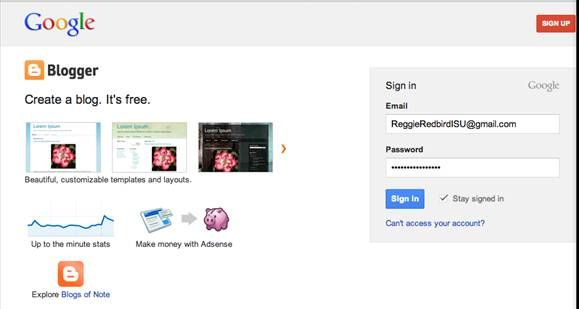
  • You will need to set up a Gmail account in order to access blogger.com

  • Make sure you keep your username and password somewhere safe so you don’t forget it!!! 

  • Once you have a Gmail account you can use this to log in to blogger.com


STEP 2 – Create a new blog

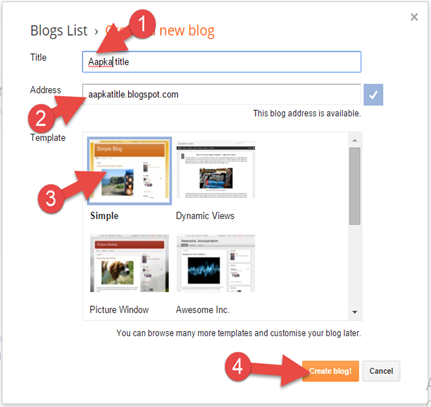
  • Your new blog name will be your name followed by  ‘Music Blog’ – 

(e.g. Paul’s Music Blog)


  • Your new blog url needs to be one word and all lower case. It will be your full name followed by ‘coulsdonmusic’ – e.g. paultornbohmcoulsdonmusic.blogspot.co.uk 

  • Once you have entered your name and

url, click on Simple option under Template section (you can change this later)

  • Then Click  on the ‘create blog’ button


Step 3 - Customising your blog

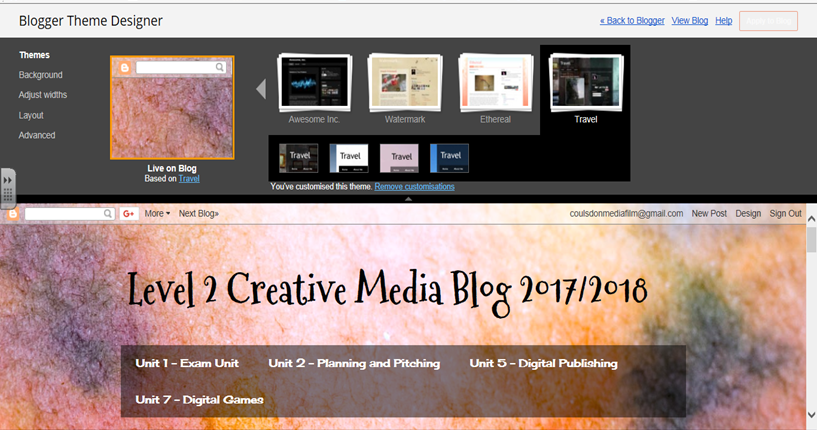
  • Once your blog has been created, you should see the following screen – under the first image, click on Customise


  • From this screen, you can change the template (we recommend using 'Awesome Inc. Artsy')


  • šYou can change the background:

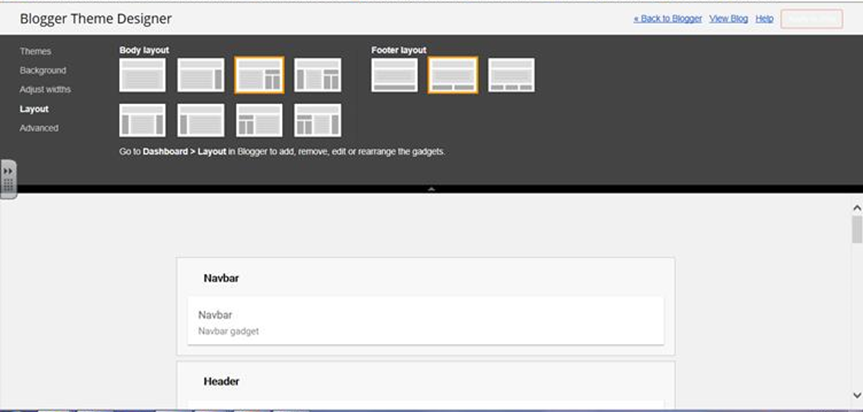
  • šYou can change the layout of the page:

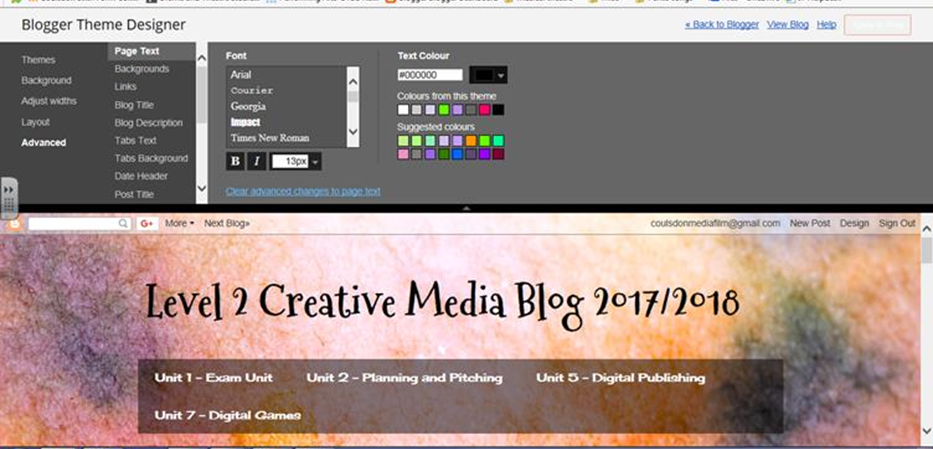
  • šOr you can change the font and font colours:


  • šOnce you have finished customising – click ‘Apply to blog’ then ‘back to blogger’


A COVID Guide to Studying Music at Coulsdon


image from https://www.timeout.com/news/face-masks-just-became-the-hottest-music-merch-of-2020

Our Music courses normally involve group rehearsals, singing and sharing of music equipment, all of which are now coming under restrictions due to COVID. Some changes will be necessary but we are doing our best to ensure all students can continue to study their courses with minimal disruption. 

The following guide explains how Music lessons will be taught under revised health and safety guidelines. We kindly ask Music students to respect and co-operate with these 8 areas of guidelines to reduce risks to all students and staff. 

1. CLASSROOM LESSONS

Lessons will still be held in class, although some teachers in the college may be teaching online from home, just as some students may be learning from home due to health reasons, shielding a family member or isolating with the virus. Important lesson resources will also be shared online, so students should check Moodle regularly.

During class lessons, it will be necessary to keep to a fixed seating plan to minimise possible contamination of computers. 

At least one classroom window should be open in each room during the day to ventilate the space.

Students should use the hand sanitiser in corridors on the way to and from lessons. Students may wear masks or other PPE if they choose to. 

2. CLASSROOM EQUIPMENT & INSTRUMENTS

All classroom equipment, including computer keyboards and mice, guitars and instruments, should be wiped before and after use. Teachers will supply wipes. The microphones will be regularly sterilised but should also be externally wiped. As usual, equipment such as microphones, cables and headphones must be signed out, treated carefully and returned before the end of the lesson. 

No equipment, including instruments or computers, should be shared until it has been cleaned first. 

Students should bring their own pens and stationery equipment to lessons. 

Technology students should bring their own headphones. 

Any music books that are used should be left to one side and pointed out to the lecturer at the end of the lesson. Pages can be photocopied to prevent regular use of the same book. 

3. RECORDING AND LIVE SOUND DESKS

This equipment should be very carefully and gently wiped before and after use, since over-cleaning may damage the equipment. It is also possible to operate this equipment from phones and tablets via virtual controller apps, which can limit the risk of contamination due to handling. 

PRESONUS StudioLive 32 U.C. Surface Controller App


PRESONUS StudioLive 32 QMIx-U.C. Controller App


4. REHEARSAL ROOMS & GROUPS

The small rehearsal rooms (214 - Drum room, 215 - Piano room, 217 - Mixing room) will now have a limit of one music student only. As always, these rooms are off-limits to non-Music students and any student inviting guests to these rooms will lose the privilege of using the room. 

The larger rehearsal room, 213, can accommodate a group of up to five students working at a 2 metre distance. 

To facilitate social distancing, full groups could work as pairs instead, such as:  
  • one singer and one guitarist or keyboardist
  • one guitarist/singer and a drummer, 
  • one keyboardist/singer, one bass player and a programmed rhythm track
Singers could work with backing tracks and guitarists with loop pedals. With smaller groups, songs could be creatively re-interpreted to 'unplugged' or stripped-back arrangements.

5. SINGING

Singing is an activity with a higher risk of infection spread, so groups of two or more singers should either stand back-to-back or side-to-side in a line, at a sensible distance from each other. The room must also be well-ventilated with at least one open window. 

6. LIVE EVENTS & LIVE SOUND ENGINEERS

Live gigs can be given online or to camera with virtual audiences. Live sound engineers can work in small teams with a small number of performers. Shows can be edited to professional standards using free Open Broadcaster software, such as https://obsproject.com


7. RECORDING AND MIXING AT HOME

Technology (and interested Performance students) should take advantage of the free recording and mixing software available for use on computers and phones: 


https://www.musictech.net/guides/buyers-guide/free-music-making-mobile-apps/

8. COVID SYMPTOMS

Any student  who becomes unwell with symptoms of COVID-19 whilst onsite must inform their tutor and/or lecturer then go home immediately and be advised to follow the Government COVID-19: guidance for households with possible coronavirus infection guidance

If you are unable to go home immediately, you should ask to be escorted to an on-site isolation room to wait.  


Monday, September 7, 2020

All BTEC Courses - Start and End Dates, Marking, Resubmissions, Extensions, Late Submissions & Re-takes


Here is a guide on:  
  • submitting work, 
  • receiving your grades, 
  • late submissions, 
  • resubmitting work, 
  • requesting an extension,  
  • re-taking a unit if you do not pass. 
Further guidance on all of these topics can be found in the BTEC Course Handbook on Moodle. 

📅  START, END & MILESTONE DATES 

All BTEC units have a start and end date, when all final work is due. This can be found at the top of the assignment brief. 

For instance: 

Unit 5

Start Date: 10th September 2020

End Date: 10th December 2020

In this example, Unit 5 has 3 tasks: 

  • Task 1 has a milestone date of 8th October 
  • Task 2 has a milestone date of 12th November. 
  • Task 3 is due at the end of the project on 10th December. 

Students should submit Tasks 1 and 2 to Moodle by the milestone dates, so the lecturer can check their work and give general feedback to the class (teachers cannot give specific feedback on grades to students until after the Unit end date). 

Students can continue to improve their Tasks 1 and 2 evidence based on the general class feedback before the final end date. 

😎 Milestone dates also allow students to spread their workload across the term rather than attempting all unit tasks in the final week that work is due. 

SUBMITTING WORK

All tasks should be uploaded on time to the hand-in folders under each unit section on Moodle. Moodle will accept uploads of most files, including Word, Powerpoint and Excel documents, mp3s and others. Students should avoid uploading PDFs as it is not possible for the lecturer to add typed comments onto these. 

✅ When you upload work to Moodle, you will be asked to tick a box confirming the work is your own and not copied from any other source. This will count as your 'declaration of authenticity' for your BTEC submission. Your written work will also be checked by the TURNITIN app, which checks your submission against written text online to ensure that you have only used short quotations. 

For this reason, you must also submit a copy of any written work on a blog to Moodle. Simply paste your written blog submissions into one Word document and upload it to Moodle. 

💯RECEIVING GRADES 

Your work will be marked within a three-week term-time period to allow time for first marking and for a sample of marked work and the grades to be checked and agreed by a second member of staff. Your work will be returned to you with comments via Moodle. Your grade will also be recorded on MyPT. 

LATE SUBMISSIONS

If a student has missed the final end date for a unit, they must immediately contact their lecturer and agree a new hand-in date, within a fortnight of the original submission date. Any student handing work in late loses the right to request a resubmission.

🔄 RESUBMISSIONS 

After the marked work is returned, if the student thinks they can improve their grade, they may request the chance to resubmit and must then notify their lecturer of their request. The lecturer will only agree to a resubmission if: 

  • all of the original work was submitted on time by the unit End Date 
  • the lecturer has authenticated the original work as the student's own and believes that it is possible for the student to improve their grade by working independently with no further help from the lecturer. 
The lecturer will then grant a resubmission and state a new hand-in date. Your work will be marked within two weeks, allowing time for a second lecturer to agree the grade is fair and accurate. 

➕DEADLINE EXTENSIONS

If a student knows in advance of genuine circumstances beyond their control that may cause them to miss a deadline, then the student should inform their lecturer no less than 2 weeks before the deadline to request an extension. Extensions are agreed at the discretion of the lecturer. 

FAILING A UNIT

If a student submits incomplete work, fails a resubmission or submits work that is plagiarised (copied from somewhere else - see below) then this can mean they have failed the unit. In this case, the student is normally offered the opportunity to take a new unit once all other units have been completed on the course (usually in May). This new unit will be a different unit from the other units on the course (i.e. re-take students will not repeat a previously taken unit) and the maximum grade awarded will be a Pass. 

❗PLAGIARISM

Students are encouraged to use websites, books, videos, television programmes and other sources to research their work. Any quotations taken from these sources should be kept brief. Longer quotations should be summarised. If a large amount of text is copied, students are at risk of being accused of plagiarism, suggesting that they have not done the work themselves but copied it from somewhere else. A student accused of plagiarism risks failing the unit and the course and is risking their place at college. For further guidance on how to avoid plagiarism, see the blog on Harvard Referencing. 


Sunday, September 6, 2020

Creating Your Artist Profile Page!


image from https://play.google.com/store/apps/details?id=com.google.android.apps.blogger&hl=en_US

Use a free Google Gmail account to make your own Blogger website. 

Always save and publish each blog post so you can share it with others. 


How to build your Artist Profile Blogger webpage!


image from https://medium.com/@MusicPromoToday/tips-for-musicians-how-to-get-your-bio-read-ca518d1cdb4a

Your artist profile = 

1. your best artist or performance photos

2. your best performance video or audio file

3. your artist bio

AN ARTIST BIO SHOULD INCLUDE: 

WHERE: Where you were born and now live

WHAT: 1. Your main instrument 2. List your 3 best musical skills (e.g. vocal range, 

HOW: How you learnt - e.g. self-taught or received lessons & number of years you've been learning

WHERE & WHEN: A list of performances with photos or recordings if possible

WHO: Other artists you have performed with

WHY: 1. Why you perform 2. Who inspires you (influences & favourite music styles)  3. Future ambitions (career - musical or not & what musical )

 Read this article for more help: 'Tips for Musicians: How to Get Your Bio Read' (from MusicPromoToday)


How to upload website links, photos, video & audio files (& emojis! 🤗 )

These four icon buttons allow you to add weblinks, pictures, videos and emojis! 

When you add:  
  • weblinks - tick the box to open the link in a new page so the reader can still view your blog at the same time
  • pictures - add a caption with the web address to show where it's from (use smallest size font)
  • videos - you can link directly from Youtube or upload from a phone or computer
  • audio files - see below
Audio files cannot be directly uploaded, as Blogger does not have an MP3 player. Instead, you can include audio recordings link to a website (1) or to a storage cloud (2)

Method 1. Play from a music website (e.g. Soundcloud, etc)

Simply paste the html link into Create/Edit URL or into Insert Video

Method 2. Link directly to file from an online Cloud 

First, upload your MP3 files on an audio hosting service like Google Drive, Dropbox etc... because you can't upload and save audio files on Blogger directly.

Then put it into post's HTML editor not the text editor. 

** Make sure you copy the link to the file itself (from 'right click' menu) and not the web address for the audio player page that opens when you click on the file**


Learn how to promote and market yourself as an artist. 'The 4D Songwriter - How to Dominate the New Music Industry' by JJ Evans (2019)

In his 2019 book, Jayson John Evans gives songwriters and performers up-to-date advice on how to promote and market themselves in the new mu...